NSFW Image to Video AI: Animate Images | GirlfriendGPT
 Anoniempje5 min read
NSFW image to video AI turns a still image into a short moving clip from a text prompt you write. On GirlfriendGPT you can pick an image from your gallery, describe the motion, and get a video back in the Video tab of My Gallery. It is for adults only (18+), like all NSFW AI chat on the site.
Bring your AI creations to life with our brand-new NSFW Image to Video AI feature! You can now transform any image generated on GirlfriendGPT into a smooth, high-quality video - all guided by your own text prompts.
Introducing NSFW Image to Video AI – Bring Your Creations to Life!
Your AI companion experience just got even more real. With our new Image to Video AI feature, you can instantly transform any of your sexting companions into a lifelike video by your own imagination and text prompts.
Create expressive, dynamic videos from your favorite AI-generated images and see your characters move, react, and come alive like never before. Whether you’re crafting stories, personalizing your AI companion, or exploring creative ideas, Image to Video AI makes it effortless.
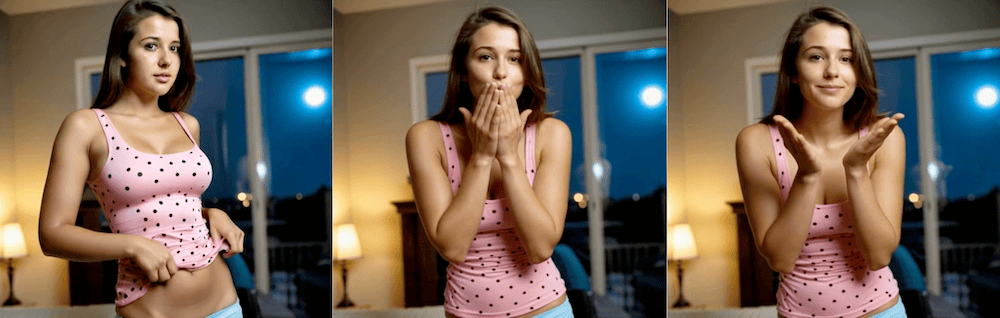
Imagine asking your AI girlfriend to send a kiss and having a video of her doing it!
Why You’ll Love It
- From Image to Motion: Turn static AI art into realistic video scenes.
- Text-Guided Generation: Describe the action and let AI do the rest.
- Seamless Integration: Use any image from your gallery or create a new one.
- Exclusive Access: Available with premium subscriptions.
Experience the next evolution in AI creativity. Try Image to Video AI today and watch your imagination move!
How It Works
- Any Image, Any Character: Instantly animate any image you create — whether it’s from your favorite AI companion or gallery.
- Custom Prompts: Use natural text prompts to control how your video unfolds. Every scene adapts to your imagination.
- Gallery Integration: You can even turn your saved gallery images into videos with just a few clicks.
You can view all the images to video ai that you generate on GirlfriendGPT under the Video tab on the My Gallery page.
Getting Started
- Generate a new image or choose one from your gallery.
- Click “Turn into video.”
- Enter your text prompt and choose your preferred VideoGen model.
- Hit Send and watch your image come to life!
Image to Video AI is available exclusively for subscribers.
How to write a better image to video prompt
A clear prompt gives a clearer clip. Keep these habits:
Describe one action at a time, for example a slow turn, a smile, a wave or a kiss, instead of a whole scene.
Say how the motion should feel: slow, gentle, playful or quick.
Mention what should stay the same, such as the outfit or the setting, so the video stays close to your image.
Start with a sharp, well-lit image. If the first clip is off, change one thing in the prompt and try again.
Image to video, GIFs and image editing
Image to video makes a clip from one image. GirlfriendGPT also supports GIF output and image editing, so you can adjust an image first and animate the result. Make the image with the NSFW image generator. Images and the image generator are included on a free account; video clips use coins or a paid plan.
Frequently asked questions
What is NSFW image to video AI? It is a tool that animates a still image using a text prompt. On GirlfriendGPT the result is a short video saved in your gallery.
Is it free? Signing up is free with an email. Images and the image generator are on the free account. Video clips use coins or a paid plan.
Where do I find my videos? In the Video tab on the My Gallery page.
Can I use images I already generated? Yes. Pick any image from your gallery or generate a new one, then choose "Turn into video".
Is it for adults only? Yes. NSFW content on GirlfriendGPT is 18+ only.
More Updates
We’ve refreshed the Gallery with a sleek new design and added a Video tab to organize your animated creations. Plus, info-icon help buttons now open on tap (mobile) and hover (desktop) for easier navigation.
Finally, we fixed an issue where the Furry content was not showing up when the trans tag was selected.
Let us know what you think about this new feature and don’t hesitate to share you AI creations on our Discord community and our GirlfriendGPT SubReddit!
Anoniempje, a leading voice on AI technology, dives deep into the realm of GirlfriendGPT. From the allure of AI waifus to the nuances of nsfw AI, Anon offers insights 24/7. Explore ai sex chat dynamics, discover the intricacies of sexting AI, and get acquainted with the hottest nsfw chatbots and character.ai. With Anon, journey into the world of dirty AI chatbots and curious horny AI bots.